Productivity tips using invoicing software have become essential for business owners who want to save time, reduce stress, and stay focused on growth. For many SMEs, freelancers, and service providers, invoicing is one of the most repetitive yet critical administrative tasks. When handled manually, it drains energy and distracts from revenue-generating work.
Fortunately, modern invoicing platforms now make it easier to automate billing, track payments, and maintain financial clarity. Tools like ProInvoice help business owners work smarter, not harder, by streamlining the entire invoicing process.
This guide explores practical, proven productivity tips using invoicing software and shows how business owners can maximize efficiency without sacrificing professionalism.
Click to download the Proinvoice mobile app now to manage your invoices anytime, anywhere with ease!


Why Invoicing Productivity Matters for Business Owners
Running a business involves juggling multiple responsibilities. From sales and customer service to operations and planning, time is always limited. Therefore, inefficient invoicing workflows quickly become productivity bottlenecks.
Common invoicing challenges include:
- Repeated data entry
- Manual calculations
- Late invoice delivery
- Chasing unpaid invoices
- Poor record-keeping
When these issues persist, productivity suffers. However, applying the right productivity tips using invoicing software helps business owners regain control of their time.
How Invoicing Software Improves Daily Productivity
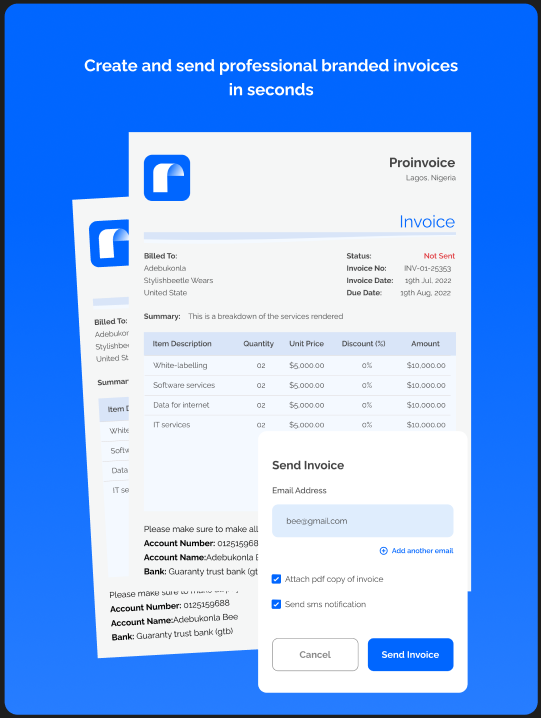
Invoicing software centralizes billing tasks into one system. Instead of switching between documents, emails, and spreadsheets, everything happens in one place.
With ProInvoice, business owners can:
- Create invoices faster
- Send invoices instantly
- Track payments in real time
- Reduce administrative workload
As a result, productivity improves across daily operations.
Top Productivity Tips Using Invoicing Software
1. Standardize Your Invoice Templates
One of the simplest productivity tips using invoicing software is standardization. Creating invoices from scratch wastes valuable time.
By using free invoice templates from ProInvoice, business owners can:
- Maintain consistent branding
- Reduce formatting time
- Avoid missing invoice details
Standard templates ensure invoices are professional and ready in minutes.
2. Use an Automated Invoice Generator
Manual invoice creation slows productivity and increases errors. Automation solves this problem.
With the free invoice generator, businesses can:
- Auto-calculate totals
- Apply VAT instantly
- Generate invoices in seconds
Consequently, business owners spend less time invoicing and more time serving clients.
Stay organized as you grow. Use ProInvoice to manage billing and client relationships with ease.
3. Save Client Information for Faster Billing
Re-entering client details repeatedly wastes time. Instead, invoicing software allows client data to be saved and reused.
Using ProInvoice, business owners can:
- Store client profiles
- Access billing history instantly
- Reduce repetitive data entry
This simple step significantly boosts productivity.
4. Automate Invoice Sending
Sending invoices manually often causes delays. Automation eliminates this inefficiency.
With ProInvoice:
- Invoices are sent instantly
- Delivery is recorded automatically
- Admin work is reduced
Therefore, business owners improve productivity while maintaining consistency.
5. Schedule Automatic Payment Reminders
Following up on unpaid invoices consumes time and energy. Automated reminders handle this task effortlessly.
By enabling reminders in ProInvoice:
- Clients receive timely nudges
- Payments arrive faster
- Business owners avoid awkward follow-ups
This automation directly improves productivity and cash flow.
6. Track Invoice Status in Real Time
Guessing which invoices are paid wastes time. Real-time tracking eliminates uncertainty.
With ProInvoice, business owners can instantly see:
- Paid invoices
- Unpaid invoices
- Overdue invoices
As a result, decisions are made faster and with confidence.
How Mobile Invoicing Boosts Productivity
Productivity is not limited to the office. Many business owners work remotely or on the move.
Using the mobile app, business owners can:
- Create invoices anywhere
- Send invoices instantly
- Track payments on the go
This flexibility ensures productivity continues regardless of location.
Reduce Errors to Save Time
Errors slow productivity because they require corrections, explanations, and re-issuance of invoices.
Invoicing software reduces errors by:
- Automating calculations
- Ensuring consistent formatting
- Preventing missing details
With ProInvoice, accuracy improves while time wasted on corrections disappears.
Centralize Financial Records for Faster Decisions
Searching through emails and folders wastes time. Centralized invoicing systems solve this problem.
ProInvoice stores:
- All invoices
- Client records
- Payment history
Therefore, business owners access information instantly and make faster decisions.
How Invoicing Software Improves Team Productivity
For businesses with teams, invoicing software improves collaboration.
With ProInvoice:
- Team members follow standardized invoicing processes
- Managers track billing activity easily
- Communication improves
As a result, productivity increases across the organization.
Stay organized as you grow. Use ProInvoice to manage billing and client relationships with ease.
Automate Recurring Invoices
Recurring clients often require the same invoice every billing cycle. Automating this process saves time.
Using ProInvoice, business owners can:
- Schedule recurring invoices
- Maintain consistency
- Eliminate repetitive work
This automation frees up hours every month.
Use Reports to Optimize Productivity
Invoicing software provides insights that manual systems cannot.
With ProInvoice, business owners can:
- Identify late-paying clients
- Track monthly revenue
- Monitor cash flow trends
These insights support smarter planning and better productivity.
Why ProInvoice Supports Productivity-Driven Businesses
ProInvoice is designed for business owners who value efficiency.
Key productivity benefits include:
- Easy onboarding
- Automated workflows
- Professional invoice design
- Mobile access
- Affordable pricing
Business owners can also start with the free invoice generator before upgrading.
Best Practices for Maximizing Productivity with Invoicing Software
To get the most out of invoicing software:
- Standardize invoice formats
- Automate reminders
- Track invoices weekly
- Use mobile invoicing
- Review reports regularly
Following these practices ensures sustained productivity gains.
Common Productivity Myths About Invoicing Software
“It Takes Time to Learn”
Modern tools like ProInvoice are intuitive and user-friendly.
“Manual Invoicing Is Faster”
Automation consistently proves faster and more reliable.
“It’s Only for Large Businesses”
Invoicing software benefits businesses of all sizes.
Click to download the Proinvoice mobile app now to manage your invoices anytime, anywhere with ease!
Final Thoughts: Productivity Starts with Smart Invoicing
Productivity tips using invoicing software help business owners reclaim time, reduce stress, and operate more efficiently. By automating repetitive tasks and centralizing billing activities, businesses unlock new levels of focus and growth.
Instead of struggling with manual invoicing, business owners can rely on ProInvoice to handle billing professionally and efficiently.
If productivity matters to your business, smart invoicing is the solution.