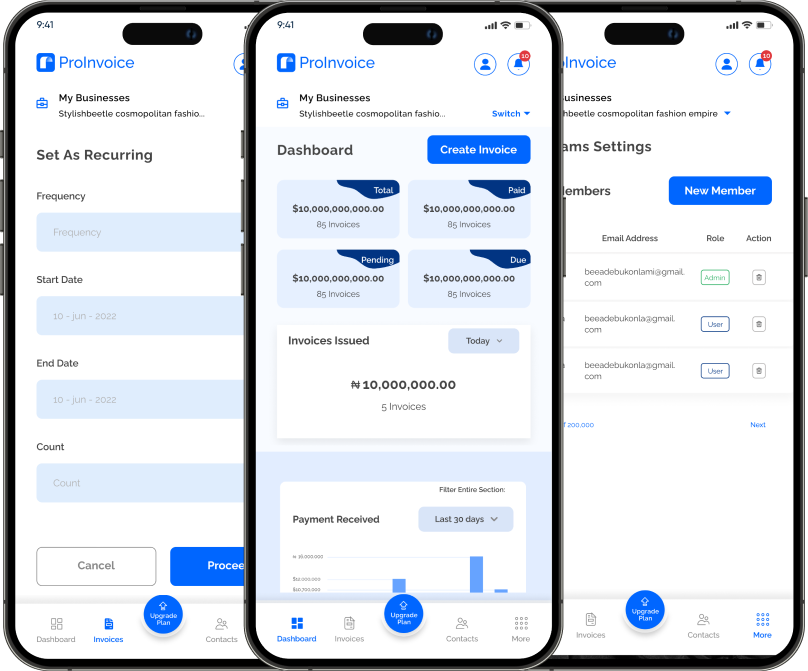
Mobile invoicing is no longer optional for modern businesses — especially for freelancers and SMEs in Africa’s dynamic markets like Kenya and Ghana. That’s where this ProInvoice mobile app review comes in. If you want to manage invoices professionally, save time, and get paid faster, a reliable mobile solution isn’t just nice to have — it’s essential.
In this review, we’ll dive deep into the features that make the ProInvoice Mobile App stand out, share practical tips to help you use it smarter, and outline best practices that boost your billing efficiency.
Whether you’re already a ProInvoice user or considering switching to a mobile invoicing tool, this review will give you the insights you need to make the most of digital billing.
What Is the ProInvoice Mobile App?
The ProInvoice mobile app is a smartphone-based invoicing solution that allows users to create, send, and track invoices anywhere, anytime. Instead of waiting to return to a computer, business owners — from freelancers to growing SMEs — can bill clients instantly from their mobile phones.
The app is part of the broader ProInvoice ecosystem, which also includes tools like the professional invoice generator and free invoice templates that seamlessly work with your mobile billing workflow.
In this review, we’ll focus on what the app offers directly and how it helps you streamline your invoicing.
Click to download the Proinvoice mobile app now to manage your invoices anytime, anywhere with ease!


Key Features of the ProInvoice Mobile App
In this section of our ProInvoice mobile app review, we’ll break down the major features that make the app a solid choice for mobile billing.
1. Clean and Intuitive Dashboard
Right after logging in, you’re greeted with a clean dashboard that shows:
- Sent invoices
- Pending invoices
- Paid invoices
This overview helps you quickly gauge your billing status for the day or week. The app presents information in a clear hierarchy, so even first-time users can navigate easily.
With this kind of layout, you spend less time searching and more time billing.
2. Easy Invoice Creation
The core function of any invoicing tool is invoice creation — and this is where the ProInvoice mobile app review finds the app shines.
To create an invoice:
- Tap “Create Invoice”
- Select or add a client
- Add products or services
- Customize invoice fields
- Send instantly
Everything you need is laid out in a step-by-step workflow. Even users with no previous invoicing experience can follow it without confusion.
Click to download the Proinvoice mobile app now to manage your invoices anytime, anywhere with ease!
3. Client Management Built In
A strong invoicing app must double as a client manager, and ProInvoice delivers this well.
Once you add a client’s contact details, the app saves them for future invoices. This means next time you want to bill the same client, you won’t need to re-enter their information — saving time and reducing mistakes.
This is especially helpful if you work with many repeat clients.
4. Automatic Calculations
Manual calculations slow down billing and invite errors. Luckily, the ProInvoice mobile app automatically calculates:
- Subtotals
- Discounts
- Taxes
- Total amounts due
This significantly reduces the risk of errors, especially if your business charges different rates or offers multiple services in one invoice.
5. Professional Customization Options
Modern clients expect professional invoices — not scribbles or plain text. The app lets you:
- Add your business logo
- Set custom invoice numbers
- Include invoice terms and notes
Your invoices will always look branded and consistent, which enhances credibility and trust.
If you want even more polished formats, you can pair your mobile invoices with pre-made designs available through ProInvoice’s professional invoice tool.
6. Real-Time Invoice Tracking
Once an invoice is sent, the next challenge is tracking its status. The ProInvoice app provides real-time tracking so you can:
- See which invoices are viewed
- Track pending and paid invoices
- Follow up appropriately
This visibility improves follow-up actions, which can lead to faster payments.
7. Multiple Sending Options
The app lets you send invoices in various ways:
- PDF downloads
- Messages (via apps already on your phone)
This flexibility ensures your clients receive invoices in the format they prefer, reducing the risk of them getting lost or ignored.
Click to download the Proinvoice mobile app now to manage your invoices anytime, anywhere with ease!
Practical Tips for Using the ProInvoice Mobile App
Now that we’ve covered features, this part of the ProInvoice mobile app review shares actionable tips you can use to get the most from the tool.
Tip 1: Set Up Client Profiles Early
Don’t wait until later to add your clients. As soon as you start working with a new client, input their details into the app. This saves time when billing repeatedly and reduces the chance of typos.
Tip 2: Use Clear Item Descriptions
Clients are more likely to pay promptly when they understand exactly what they’re being billed for. Always use clear, concise item descriptions in your invoices. For example:
Instead of “Service,” write “Website design for October 2025.”
Tip 3: Include Payment Instructions
Even though ProInvoice tracks invoice delivery and status, you should still include clear payment terms (like due dates and acceptable methods) inside the invoice. Clients appreciate clarity, and this reduces follow-ups.
Tip 4: Review Before You Send
Always preview your invoice before sending it. ProInvoice lets you do this easily, and a quick review helps you catch:
- Typos
- Wrong quantities
- Incorrect prices
A clean invoice reflects well on your brand.
Tip 5: Use Templates for Recurring Invoices
If you invoice the same services regularly (e.g., monthly retainers), save time by using templates or duplicate features available within ProInvoice. This speeds up your process and ensures consistency.
Tip 6: Sync Other Tools
If you use other parts of the ProInvoice ecosystem — such as the free invoice generator or free invoice templates — make sure your billing aligns with what you send from the app. This creates a consistent brand experience for clients.
Best Practices Every Freelancer and SME Should Follow
Beyond tips, here are best practices that make a real difference in how effectively you use the ProInvoice mobile app.
Practice 1: Invoice “Immediately”
Delay is the enemy of timely payment. As soon as a job is completed, use the ProInvoice app to send an invoice right away. This reduces payment delays and improves your cash flow.
Practice 2: Track Invoice Status Daily
Make it a habit to check your invoice dashboard every day. Identifying overdue invoices early helps you act promptly, instead of letting them pile up.
Practice 3: Encourage Quick Payments
You can include a short note like “Thanks for your business! Payment within 7 days helps us serve you better.” Personal touches like this improve client goodwill and payment response.
Practice 4: Keep Records Organized
The ProInvoice app stores all your invoices digitally. However, you should still organize them with meaningful names, dates, and client tags. This makes reporting and tax-related tasks easier later.
Practice 5: Update Pricing When Needed
If your services or products change prices, update your settings right away. This avoids accidental undercharging or confusion during billing.
Pros and Considerations (Objective in This Review)
Why ProInvoice Stands Out
✔ Easy to learn and use
✔ Mobile-first invoicing workflow
✔ Real-time tracking of invoices
✔ Professional invoice appearance
✔ Automatic calculations
✔ Great for freelancers and SMEs
Things to Keep in Mind
🔹 The app focuses on invoicing — so broader accounting features (like payroll or inventory) are not included.
🔹 Some users may prefer linking invoices with external payment gateways — but that depends on your business needs.
Despite these points, if your goal is fast, professional, mobile-based billing, ProInvoice excels.
Click to download the Proinvoice mobile app now to manage your invoices anytime, anywhere with ease!
How This App Compares in a Business Workflow
Let’s imagine a freelancer — say, a graphic designer in Accra — finishing work for a new client.
Without mobile billing:
- The designer waits until returning home
- Manually types an invoice on a computer
- Sends it later
With the ProInvoice mobile app:
- The designer creates and sends the invoice immediately
- Client receives it before leaving the meeting
- Payment comes sooner — boosting cash flow
This speed advantage alone is worth adopting mobile billing.
Click to download the Proinvoice mobile app now to manage your invoices anytime, anywhere with ease!
Final Verdict: ProInvoice Mobile App Review Summary
After exploring features, sharing tips, and outlining best practices, this ProInvoice mobile app review lands on a clear conclusion:
ProInvoice delivers powerful mobile invoicing with professional results.
It helps freelancers, small businesses, and consultants save time, stay organized, and get paid faster — all from their phones.
Whether you’re just starting or scaling up, the ProInvoice Mobile App gives you a modern, efficient invoicing experience without complexity.
For even more billing flexibility, you can complement the app with the professional invoice tool and use free invoice templates whenever you need polished formats.