Growing businesses in Kenya and Ghana need invoicing tools that are fast, professional, and flexible. That’s exactly why ProInvoice invoice templates are becoming essential for SMEs, freelancers, and service providers across both markets. These ready-made templates save time, reduce billing errors, and help businesses create invoices that look polished and credible.
Whether you run a consulting firm in Nairobi or a creative agency in Accra, using structured templates ensures that every invoice you send is clear, accurate, and error-free. In this article, you’ll learn everything you need to know about ProInvoice invoice templates, how to use them effectively, and why they help you get paid faster.
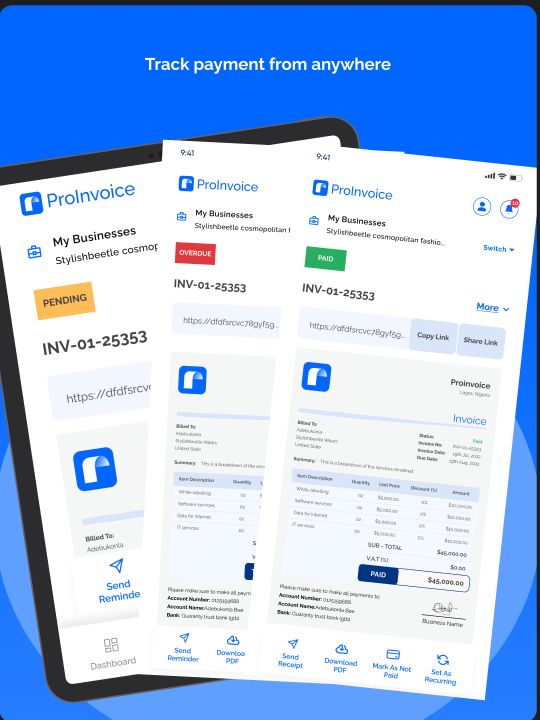
Click to download the Proinvoice mobile app now to manage your invoices anytime, anywhere with ease!


What Are ProInvoice Invoice Templates?
ProInvoice invoice templates are pre-formatted designs that help you create professional invoices instantly. Instead of starting from a blank page, you choose a layout that already includes:
- Your business name and logo
- Client information fields
- Itemized charges
- Totals and taxes
- Payment terms
These templates allow entrepreneurs in Kenya and Ghana to stay consistent and professional across all billing documents. Using ProInvoice, you can select, customize, and reuse templates for every client.
Why Kenyan & Ghanaian Businesses Should Use Digital Templates
Many SMEs and freelancers in Kenya and Ghana still rely on manual invoices — handwritten bills, Word documents, or poorly formatted PDFs. However, these methods often lead to mistakes, confusion, and delayed payments.
In contrast, using ProInvoice invoice templates ensures:
- Clear and professional layouts
- Standardized invoice structure
- Reduced calculation errors
- Faster invoice creation
- Easier record-keeping
Because templates remove guesswork from invoicing, business owners can focus on growth instead of admin work.
How to Access ProInvoice Invoice Templates
Accessing and using ProInvoice invoice templates is simple and beginner-friendly.
- Log into your ProInvoice dashboard.
- Go to the “Templates” or “Create Invoice” section.
- Choose from a selection of formatted invoice designs.
- Customize the layout with your business details.
- Save it for future use.
Since every template is pre-structured, you don’t need advanced technical skills to produce a professional invoice.
Click to download the Proinvoice mobile app now to manage your invoices anytime, anywhere with ease!
Customizing Templates for Your Business
Every business is unique, and your invoice should reflect your brand. ProInvoice allows you to customize invoice templates in multiple ways. For example:
Add Your Brand Logo
Uploading your logo makes invoices instantly recognizable. This builds trust with clients in both Kenya and Ghana.
Edit Business Information
Ensure your details — such as business name, address, and contact — are correct. This is especially important for record-keeping and compliance.
Modify Colors and Layouts
While keeping structure intact, some templates let you adjust colors and positioning to match your brand identity.
These customizations help you use ProInvoice invoice templates not just as billing tools but as branding statements.
Templates That Help Avoid Billing Errors
Billing errors — such as missing totals, wrong client details, or incorrect calculations — happen far too often in manual invoicing. This leads to client confusion, disputes, and delayed payments.
ProInvoice’s invoice templates are built with error prevention in mind. Since they:
- Use automated totals and tax calculations
- Include all mandatory invoice fields
- Avoid formatting inconsistencies
They significantly reduce the risk of mistakes.
You don’t have to worry about forgetting to include the due date or misplacing item prices — the template sets the structure for you.
Click to download the Proinvoice mobile app now to manage your invoices anytime, anywhere with ease!
Real-World Use: Kenyan SMEs
Imagine a small digital marketing business in Nairobi. After completing a campaign for a new client, the business owner opens the ProInvoice Mobile App, selects a professional invoice template, and fills in the details.
Within minutes, they have a clean, branded invoice ready to send. Because the invoice is accurate and professional, the client approves it without hesitation — and payment arrives sooner.
This real-world example shows how ProInvoice invoice templates speed up billing and improve cash flow for Kenyan SMEs.
Real-World Use: Freelancers in Ghana
Freelancers in Accra often juggle multiple clients. Keeping track of invoices manually can be chaotic.
Using ProInvoice invoice templates, a freelance graphic designer can create:
- A branded invoice for a logo design
- A separate invoice for monthly retainer work
- A customized invoice for event photography
All without starting from scratch.
When clients receive invoices that look professional and clear, they are more likely to pay promptly — which improves cash flow and reputation.
Templates That Align With Best Practices
Good invoice templates encourage best invoicing practices, such as:
- Including clear payment terms
- Adding due dates
- Listing itemized descriptions
- Applying accurate tax calculations
ProInvoice templates come with these fields built-in, so you don’t need to think about them every time. This is especially helpful for SMEs and freelancers who want to project a professional image in both Kenyan and Ghanaian markets.
Click to download the Proinvoice mobile app now to manage your invoices anytime, anywhere with ease!
How Templates Improve Record-Keeping
Keeping clean financial records is essential for tax compliance, audits, and business planning.
ProInvoice solves this by storing all invoice templates and records digitally. When you use a template:
- The invoice becomes part of your digital history
- You can search by client, date, or amount
- You can prepare reports anytime
Digital record-keeping through ProInvoice helps SMEs stay organized and compliant with minimal effort.
Templates Work With Automation for Faster Workflow
ProInvoice doesn’t just offer templates — it combines them with automation. For example:
- Once you save a customer profile, details auto-populate next time
- Tax and totals are calculated automatically
- Recurring invoices can use the same template with new data
This automation further accelerates your invoicing workflow and reduces manual effort.
Tips for Choosing the Right Template
Not all invoices are the same. Consider these tips when selecting ProInvoice invoice templates:
1. Match Your Brand
Choose a design that fits your business personality. For example, a consultancy might prefer a clean, simple layout, while a creative agency may select a more stylized design.
2. Consider the Industry
Certain industries may require additional fields (e.g., project codes, item quantities, package details).
3. Keep It Clear
Even though customization is possible, clarity should always come first. Avoid cluttered layouts.
With ProInvoice, you can try multiple templates and pick the one that best supports your business.
Click to download the Proinvoice mobile app now to manage your invoices anytime, anywhere with ease!
Digital vs Paper: Why Kenya & Ghana Are Going Digital
In both Kenya and Ghana, digital solutions are replacing manual paperwork fast. Reasons include:
- Greater access to smartphones
- Faster internet connectivity
- Increased comfort with digital tools
- Spread of mobile money and online payments
Because of this shift, tools like ProInvoice are becoming indispensable for businesses that want to grow without being held back by manual billing.
Click to download the Proinvoice mobile app now to manage your invoices anytime, anywhere with ease!
What to Watch for in Future Templates
The future of ProInvoice invoice templates will likely include:
- Smart templates with industry presets
- AI-suggested descriptions based on past invoices
- Multi-currency and localized tax options
- Instant payment links embedded in templates
These features will make invoicing even faster and more adaptable for African SMEs.
How to Get Started With ProInvoice Templates
Getting started is simple:
- Sign up with ProInvoice
- Explore the available invoice templates
- Customize your chosen template
- Save it for repeat use
- Start invoicing clients confidently
You can begin with the free invoice generator if you want to try a template instantly.
For everyday use, download the ProInvoice Mobile App and save your preferred templates for quick access on the go.
Final Thoughts
Invoicing is more than billing — it’s part of your business’s reputation. When your invoices are professional, accurate, and easy to understand, clients trust you more and pay faster.
ProInvoice invoice templates give SMEs and freelancers in Kenya and Ghana a powerful tool to:
- Save time
- Reduce errors
- Stay organized
- Improve cash flow
- Maintain professional standards
With ProInvoice, invoicing becomes a competitive advantage rather than a chore.
👉 Ready to get started?
Download the ProInvoice Mobile App:
📲 https://proinvoice.co/mobile-app/
🧾 Learn more about templates:
🔗 https://proinvoice.co/professional-invoice-new/