If you want to send invoices faster and get paid on time, mobile invoicing is no longer optional. Many businesses delay payments simply because invoices are sent late or created manually. Fortunately, you can now send invoices using ProInvoice app directly from your phone, without waiting to return to an office.
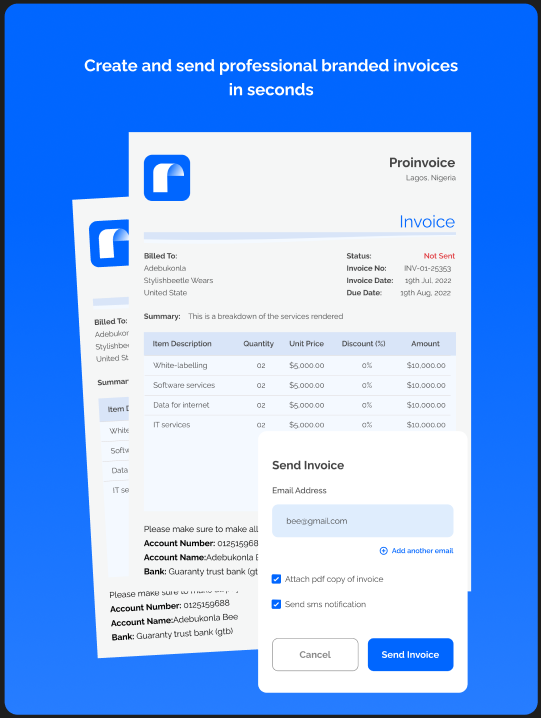
The ProInvoice Mobile App allows business owners, freelancers, and SMEs to create professional invoices, send them instantly, and track payments in real time. From the moment a job is completed, invoicing becomes quick, accurate, and stress-free.
In this guide, you’ll learn how to send invoices using ProInvoice app step by step, even if you’re new to digital invoicing.
Click to download the Proinvoice mobile app now to manage your invoices anytime, anywhere with ease!


Why Sending Invoices Using ProInvoice App Matters
Many businesses lose money due to slow invoicing. When invoices are delayed, payments are often delayed too. However, when you send invoices using ProInvoice app, billing happens immediately.
As a result:
- Clients receive invoices on time
- Payment timelines improve
- Cash flow becomes more predictable
Additionally, ProInvoice ensures every invoice looks professional, which builds trust with clients.
Getting Started with the ProInvoice Mobile App
Before you send invoices using ProInvoice app, you need to access the mobile platform.
Simply open the ProInvoice Mobile App on your smartphone and log in. Once inside, you’ll see a clean dashboard showing all your invoices in one place.
From the dashboard, you can quickly:
- View sent invoices
- Check pending payments
- Confirm paid invoices
Therefore, you always know where your business stands financially.
Step 1: Create a New Invoice in ProInvoice App
To begin the process of sending invoices using ProInvoice app, tap the option to create a new invoice.
Unlike manual invoicing, ProInvoice automatically prepares a structured invoice layout. This means you don’t need design or accounting skills to get started.
At this stage, the app guides you smoothly through each step, making invoicing simple and efficient.
Step 2: Add Client Details When Sending Invoices
Next, you’ll add your client’s information. This step is essential when you send invoices using ProInvoice app.
You can either:
- Select an existing client, or
- Add a new client instantly
Once saved, ProInvoice stores client details securely. As a result, future invoices take less time to create.
Click to download the Proinvoice mobile app now to manage your invoices anytime, anywhere with ease!
Step 3: Add Products or Services to the Invoice
After selecting a client, you can now add the services or products you are billing for.
When you send invoices using ProInvoice app, you can:
- Write clear descriptions
- Enter quantities and prices
- Apply discounts if necessary
Most importantly, ProInvoice calculates totals automatically. Therefore, you avoid mistakes that could delay payments.
For more advanced invoicing needs, ProInvoice also provides a professional invoice tool that works seamlessly with the mobile app.
Step 4: Customize Invoice Details for Clarity
Customization improves understanding and speeds up payments. While sending invoices using ProInvoice app, you can easily customize key invoice details.
These include:
- Invoice numbers
- Due dates
- Payment terms
- Notes or short messages
Clear invoice details help clients know exactly what to pay and when.
Additionally, you can use free invoice templates from ProInvoice to maintain consistent formatting.
Step 5: Review the Invoice Before Sending
Before you complete the process of sending invoices using ProInvoice app, always review your invoice.
The preview feature allows you to double-check:
- Client information
- Item descriptions
- Invoice totals
- Due dates
As a result, you send accurate and professional invoices every time.
Step 6: Send Invoices Using ProInvoice App Instantly
Once you confirm everything is correct, you can send the invoice instantly.
When you send invoices using ProInvoice app, delivery options include:
- Downloadable PDF
- Messaging platforms
Because invoices are sent immediately, clients receive them while the service is still fresh in their minds. Consequently, payment delays reduce significantly.
For simple or one-time billing, you can also use the free invoice generator provided by ProInvoice.
Step 7: Track Invoice Status After Sending
Sending invoices using ProInvoice app does not end after delivery. Instead, ProInvoice continues to support you with real-time tracking.
You can:
- Monitor pending invoices
- Identify overdue payments
- Confirm successful payments
Therefore, follow-ups become easier and more professional.
How Sending Invoices Using ProInvoice App Improves Cash Flow
Cash flow problems often come from poor invoicing habits. However, when you send invoices using ProInvoice app, billing becomes timely and consistent.
Each invoice clearly shows:
- Amount due
- Payment deadline
- Itemized charges
As a result, clients understand expectations clearly and are more likely to pay on time.
Managing Multiple Clients with ProInvoice App
As your business grows, invoicing becomes more complex. Fortunately, sending invoices using ProInvoice app helps you stay organized.
With ProInvoice, you can:
- Manage multiple clients easily
- View all invoices in one dashboard
- Keep accurate billing records
Therefore, growth does not create billing chaos.
Click to download the Proinvoice mobile app now to manage your invoices anytime, anywhere with ease!
Best Businesses for Sending Invoices Using ProInvoice App
Sending invoices using ProInvoice app works especially well for:
- Freelancers
- Consultants
- Service providers
- Small and medium-sized businesses
Because the app is mobile-friendly, invoicing fits naturally into daily operations.
Why Businesses Prefer ProInvoice for Mobile Invoicing
Businesses prefer ProInvoice because it combines simplicity with powerful invoicing tools. Sending invoices using ProInvoice app saves time, reduces errors, and improves professionalism.
Key benefits include:
- Easy mobile invoicing
- Professional invoice layouts
- Secure record keeping
- Real-time payment tracking
Therefore, businesses can invoice confidently and focus on growth.
Final Thoughts
Learning how to send invoices using ProInvoice app is one of the smartest steps a business can take. It eliminates delays, improves cash flow, and strengthens client relationships.
With the ProInvoice Mobile App, you can create, send, and manage invoices anytime, anywhere. Whether you invoice occasionally or daily, ProInvoice gives you full control over your billing process.
Click to download the Proinvoice mobile app now to manage your invoices anytime, anywhere with ease!