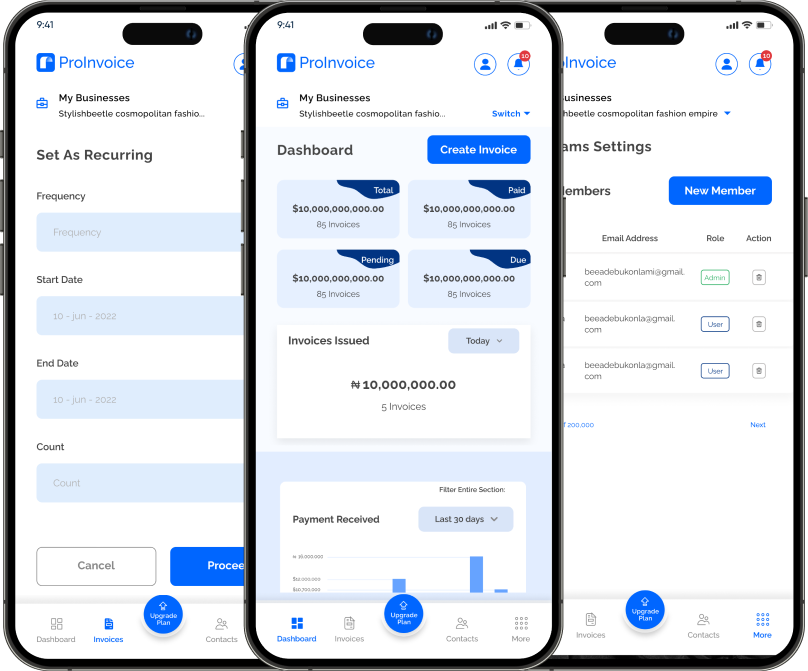
Running a business today means moving fast. Clients expect professionalism, speed, and clarity — even when you are away from your office. This is why mobile invoicing has become essential for small and medium-sized businesses. With the ProInvoice Mobile App, business owners can create professional invoices, send them instantly, and track payments directly from their phones.
Whether you are a freelancer, retailer, consultant, or growing SME, the ProInvoice mobile experience allows you to invoice clients the moment a job is completed, helping you get paid faster and stay organized.
Click to download the Proinvoice mobile app now to manage your invoices anytime, anywhere with ease!


Why Mobile Invoicing Is Important for Modern Businesses
Delaying invoices often leads to delayed payments. Many businesses still wait until the end of the day or week to send invoices, which slows cash flow. Using ProInvoice on mobile removes this problem entirely.
With the ProInvoice Mobile App, you can:
- Create invoices immediately after service delivery
- Reduce payment delays
- Present a professional brand image
- Track invoice status in real time
- Manage billing without paperwork
Mobile invoicing gives businesses flexibility and financial control, especially when dealing with multiple clients.
Getting Started with the ProInvoice Mobile App
Setting up the ProInvoice mobile app is quick and beginner-friendly.
After installing the ProInvoice Mobile App, you’ll be prompted to create your business profile. This includes your business name, contact details, and branding information. These details automatically appear on every invoice you generate, ensuring consistency and professionalism.
Once your profile is ready, you can start invoicing immediately.
How to Create an Invoice Using ProInvoice on Mobile
Creating an invoice with ProInvoice takes just a few steps.
Step 1: Create a New Invoice
From the dashboard, tap “Create Invoice.” The ProInvoice interface is clean and intuitive, allowing you to focus on billing without distractions.
Step 2: Add Client Information
You can select an existing client or add a new one instantly. ProInvoice saves client details securely, making future invoicing faster and easier.
Adding Products and Services to Your Invoice
After selecting your client, you can add the services or products you are billing for.
With ProInvoice, you can:
- Add item descriptions
- Enter quantities and prices
- Apply discounts
- Automatically calculate totals
This reduces errors and removes the need for manual calculations.
For businesses that want advanced formatting options, ProInvoice also offers a full professional invoice tool that works seamlessly alongside mobile invoicing.
Customizing Your Invoice for a Professional Look
Professional invoices build trust. With ProInvoice, customization is simple.
You can:
- Set invoice numbers automatically
- Add due dates and payment terms
- Include notes or thank-you messages
If you need ready-made formats, ProInvoice provides easy access to free invoice templates designed for clarity and professionalism.
Sending Invoices Instantly from Your Phone
One of the biggest advantages of using ProInvoice is speed.
Invoices created on the ProInvoice Mobile App can be sent instantly via email or shared as downloadable PDFs. Sending invoices immediately after completing a job increases the likelihood of prompt payment.
For quick billing without logging in, ProInvoice also offers a free invoice generator that complements mobile invoicing perfectly.
Tracking Payments with ProInvoice
Tracking invoices manually can be stressful. ProInvoice removes the guesswork by giving you full visibility.
Using the mobile app, you can:
- See sent, pending, and paid invoices
- Identify overdue invoices quickly
- Monitor cash flow in real time
This makes follow-ups easier and helps businesses maintain steady income.
How ProInvoice Helps You Get Paid Faster
Late payments affect business growth. ProInvoice tackles this problem through clear invoicing and smart reminders.
Invoices generated with ProInvoice clearly display:
- Total amount due
- Payment deadlines
- Terms and conditions
This clarity improves client response and reduces payment delays.
Click to download the Proinvoice mobile app now to manage your invoices anytime, anywhere with ease!
Managing Multiple Invoices on the Go
As your business grows, managing invoices becomes more complex. The ProInvoice Mobile App keeps everything organized in one dashboard.
You can:
- View all invoices in one place
- Search by client or status
- Keep accurate financial records
This level of organization helps business owners stay in control, even when managing multiple clients.
Recurring Invoices Made Easy with ProInvoice
For businesses offering recurring services, ProInvoice supports repeat invoicing. This ensures clients are billed consistently without manual effort.
Recurring invoicing is ideal for:
- Subscription services
- Monthly retainers
- Ongoing contracts
With ProInvoice, nothing falls through the cracks.
Why Businesses Choose ProInvoice for Mobile Invoicing
Businesses choose ProInvoice because it combines simplicity with powerful invoicing tools.
Key benefits include:
- Mobile-friendly invoice creation
- Professional branding
- Secure invoice storage
- Real-time payment tracking
Everything is designed to help businesses invoice confidently and professionally.
Click to download the Proinvoice mobile app now to manage your invoices anytime, anywhere with ease!
Final Thoughts
Mobile invoicing is no longer optional for modern businesses. With the ProInvoice Mobile App, you can create, send, and manage invoices wherever business takes you.
By using ProInvoice, you eliminate delays, improve cash flow, and present a professional image to clients. Whether you’re invoicing one client or managing dozens, ProInvoice gives you the tools to stay ahead.
Click to download the Proinvoice mobile app now to manage your invoices anytime, anywhere with ease!